Reusable shifts
Keep your regular working patterns in a shift library.
- Named shift templates
- Start and finish times
- Unpaid breaks
- Shift colours
- Overnight shifts
- Optional role labels
Reusable shifts, staff assignments and the changes that make each week different.
3 feature groups
Keep your regular working patterns in a shift library.
Place shifts on dates and add the people working them.
Plan across locations and focus on one site when you need to.
Your shift library holds the hours you reuse. The calendar holds the dates and the people working them.
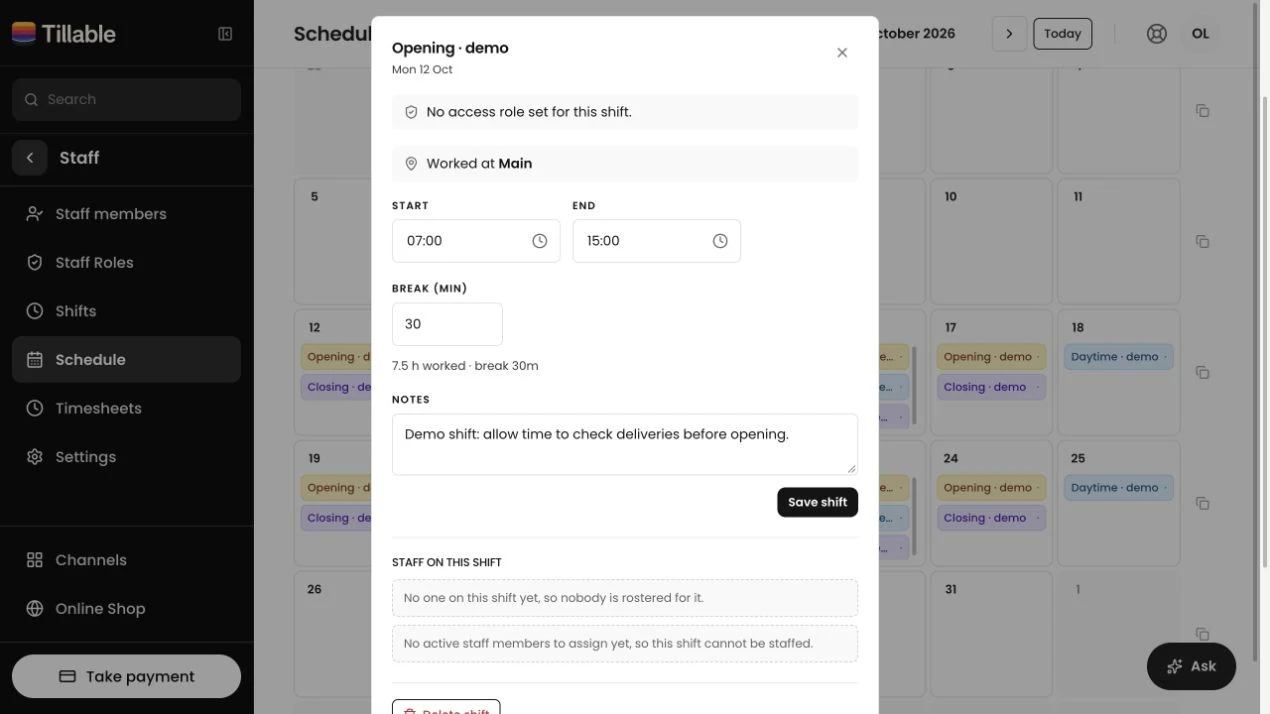
Save the name, start, finish, unpaid break and colour. Optionally give the shift a site or a role label.
Choose the day and assign active staff. Edit that day’s hours or break, add notes, or change who’s working.
A shift ending after midnight stays together. The calendar marks it with +1 to show that the finish falls on the following day.
An end time equal to or earlier than the start is treated as the next day. There’s no need to split the shift.
An optional role appears against the shift. Staff permissions are managed separately in Access Permissions.
Check busy hours in Reporting and manage who can do what in Access Permissions.
Yes. Change that day’s start, finish, unpaid break or notes without editing the reusable shift template.
Yes. The copy includes the week’s shifts, their sites and the people assigned to them. Review the following week and adjust anything that differs.
Yes. Assign several active staff members to the same shift. You can change the people assigned to an individual day.
The rota records planned shifts. Plus and Enterprise include Time & Attendance for clock entries, timesheets and comparison with scheduled hours.
Yes. Set a shift for a particular site or any site. The calendar includes a site filter when you have multiple sites.
Yes. If the end time is the same as or earlier than the start, the shift runs into the following day. It carries a +1 marker on the rota.

We’ll show you how to set up your shifts, add your team and plan the week in Tillable.